
|

|
In this issue
|
A reader wrote in after last week's issue. They'd already built the thing I described. A folder that holds their brand and their voice, so everything they put out already sounds like them. They wrote back with one question: now what? How do I actually get the most out of this?
Good question. The honest answer is that loading your voice is only the setup. It sits there until something puts it to work. That something is a skill.
Here's the part most people miss. You're probably re-explaining the same job to your AI every time you sit down with it. The shape of your weekly client update. The way you turn a sales call into a follow-up. The five things you check every Monday before coffee. A skill is that instruction, written down once, so you stop repeating yourself and the work starts running the same way every time.
So this week I'm opening up one real skill I run, start to finish, so you can see exactly what's inside it. Then I'll show you where it goes when one skill isn't enough.
How to build a skill
The fastest way to a skill that works is to not write one for a while. Here's the progression, and the skill I run at the end of it.
|
Every week I owe one of my clients a status update. What shipped, what I need from them, what's coming. It's a half hour of pulling threads together from five different places and then writing it so it sounds like me. I did it by hand for a while. Now a skill does the pull and the first draft, and I do the part that actually needs me.
A skill is just a written instruction the AI follows the same way every time. Not a clever prompt I retype. A saved procedure that lives in a file, named for the job it does, that I trigger by saying "write the weekly update." But before I show you what's inside it, the most useful thing in this issue is how you should get there.
Here's the strong opinion: don't start by writing a skill. Most people hear the word, get excited, and go try to build one cold. Wrong order. You'll write a careful file for a job you don't actually understand yet, and it'll be wrong in ways you can't see.
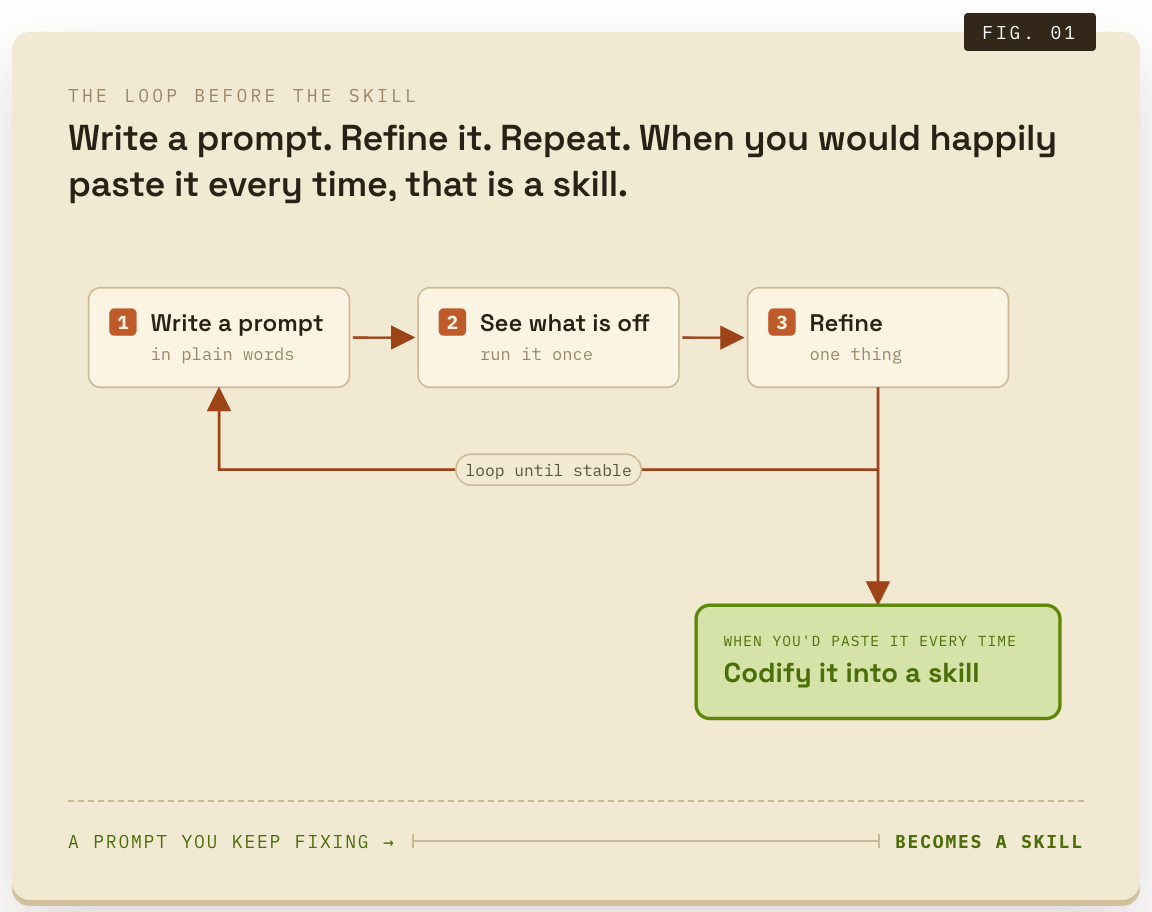
Start with the prompt instead. Do the job the slow way first. Type out what you want, in plain words, every time you do it. The weekly update, the lead triage, whatever it is. You're not building anything yet. You're doing the work and paying attention.
Then make the prompt better, one thing at a time. Next time, fix the part that came out wrong. The week after, tighten it again. You'll start saving the good version and pasting it back in, because retyping it is annoying. That annoyance is the signal. Keep going until you have a prompt you're happy to copy, paste, and run to get the same work, the same way, every time.
That's the moment. Now you turn it into a skill, and you don't write the file yourself. You hand Claude the prompt you've been refining and say, make this a skill. It writes the proper file for you, names it, saves it, so you stop pasting it. You earned it by doing the job enough times to know exactly what it needs.
|
Not just my opinion
This is how Anthropic, the company that makes Claude, tells you to do it: work through the task with normal prompting first and let the skill emerge from what you keep repeating, because that is how you learn what the instruction actually needs instead of guessing up front. Their teams say their best skills started as a few lines and one hard-won lesson, and got better every time the work hit a new snag. The prompt comes first. Always.
|
So here's what mine looks like at the end of that road. The weekly client update, after I'd done it by hand enough times to know every step. Five of them, none technical.
| 01 | It checks the scope with me. Anything to leave out this week, anything to lead with. If I say "just draft it," it skips ahead with the defaults. Thirty seconds. |
| 02 | It gathers. It reads the current status of every project tied to that client, the open tasks with their name on them, and the last week of our shared Slack and my meeting notes. This is the half hour it gives me back. Five places at once, instead of five tabs. |
| 03 | It writes the draft in my voice. This is where last week's setup earns its keep. The skill loads my writing rules before it composes a single line, so the draft reads like me and not like a chatbot. |
| 04 | It checks its own work before handing it over. It runs a list of pass-or-fail checks and won't show me the draft until they all pass. Any em dashes. Any project listed twice. And the one that matters most: did anything meant for one client end up in another client's update. That last check is a hard stop. |
| 05 | It stops. It writes the draft, flags the two or three lines it wants my eyes on, and hands it over. It does not send. I read, I fix, I send it myself. |
That last step is the whole philosophy. The skill does the gathering and the first pass, which is most of the work and none of the judgment. I keep the judgment and the send button. You do not hand a client relationship to software, and a good skill is built so you never have to.
|
In your other tool
ChatGPT (Projects, custom GPTs) and Gemini (Gems) let you save instructions the same way. The progression is identical: refine the prompt first, save it once it's stable.
|
You don't need to write the file yourself to ask for one. You need to be able to say: here's a job I do every week, here are the places the information lives, here's how I want it to sound, and I want a draft, not a send. That sentence is a spec. Any competent builder can turn it into a skill.
One skill saves you a half hour. The interesting part is what happens when you have a few. Once the first one works, you start noticing the other jobs you keep re-explaining. So you write those down too. And a couple of things change.
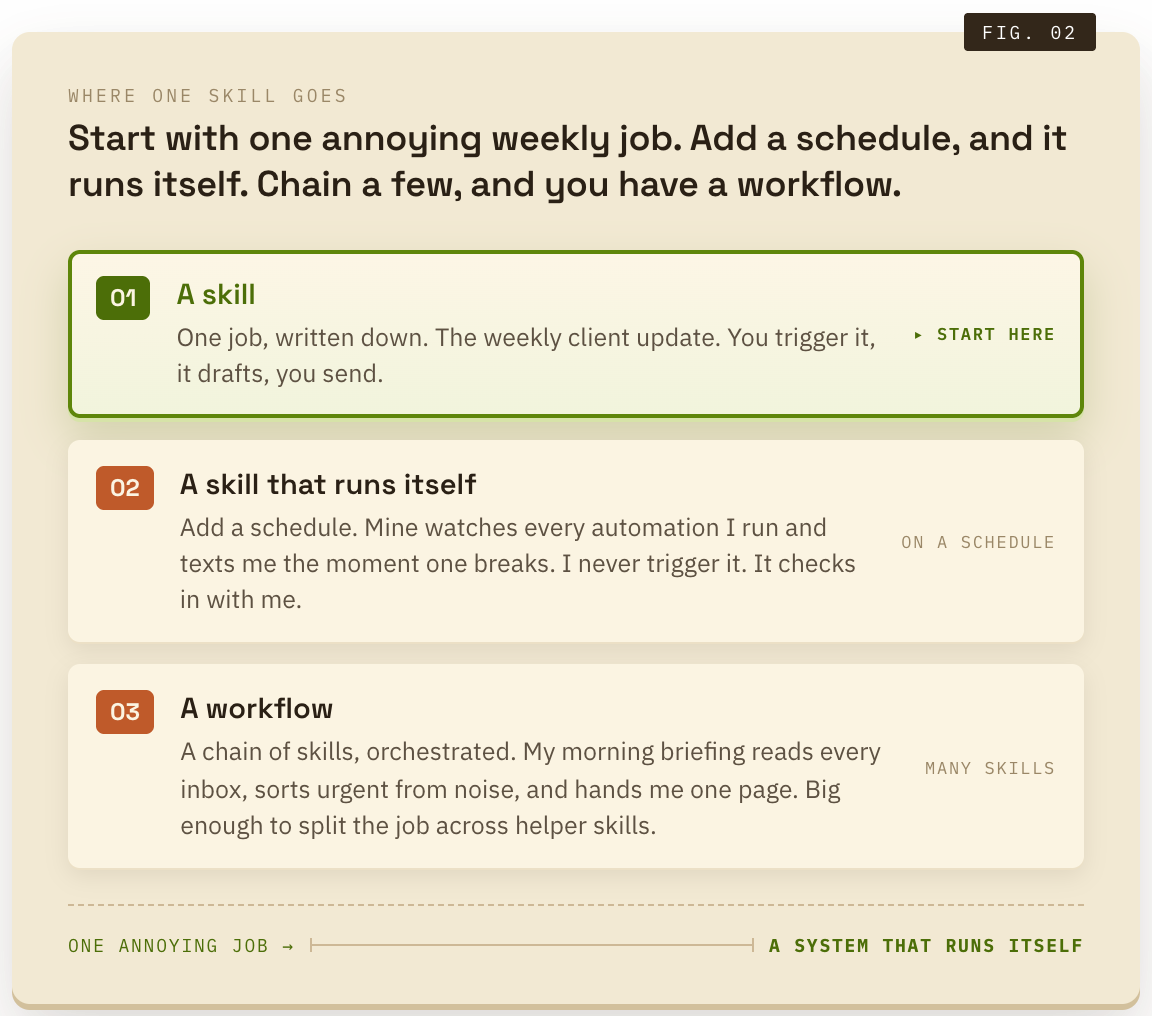
Some skills stop waiting for you to ask. A skill plus a schedule is the difference between you checking on the work and the work checking in with you. It runs on its own and only speaks up when something needs you.
And some skills grow into something bigger. That's the line between a skill and a workflow. A skill is one job. A workflow is a chain of them, with the steps and the handoffs written down so the whole sequence runs the same way every time. You don't start there. You start with one annoying weekly job and one file. The workflow is just what you have after you've done that five times.
The whole thing lives on a page you can keep. I put together a free playbook with the progression and a copy-paste skill you can grab and use today. Don't grab it on day one. Grab it after you have a prompt you're tired of pasting. That's when it'll actually be right. Grab the playbook here.
Two reads worth your time
What moved this week, and why it matters from the operator's seat.
|
How People Are Really Using AI in 2026. The third annual ranking of what people actually use AI for. Read it for one move: find the job on that list you already do every week, and start there. The best use of AI is rarely the flashiest thing on the page, it's the boring task you repeat. HBR, Marc Zao-Sanders · Jun 1
Small businesses embrace AI, but few have built it in. Goldman surveyed 1,256 owners: 76% now use AI and 93% say it helps, but only 14% have woven it into how they actually operate. Adopting AI is easy now. Building it into the way you work is the part almost nobody has cracked, and it's the whole point of today's issue. Goldman Sachs · Mar 2026
Skill, workflow, agent: what they actually mean
Three words the AI world uses interchangeably. They are not the same thing, and the difference is simple.
|
You'll hear all three from vendors, often in the same sentence. Here's each one in plain English, smallest to biggest.
A skill is one job, written down. A saved instruction the AI follows the same way every time. "Draft my weekly update." "Sort this week's leads." One job, one file.
A workflow is a chain of skills, orchestrated. Several jobs strung together with the handoffs defined, so the whole sequence runs start to finish on its own. My morning briefing is a workflow.
An agent is the part people oversell, so here's the plain version. A skill and a workflow follow steps you defined. You give an agent a goal instead of steps, and it works out the steps itself. It tries something, looks at the result, decides the next move, and keeps going until the goal is met. "Find three suppliers for this part, compare their prices, and email me the best one." You never told it how. That open-ended loop is the whole idea, and it's also why "agent" is the word a pitch reaches for when it wants to sound impressive. It earns its keep on narrow, bounded jobs. It gets risky the moment the goal is fuzzy or a wrong move is expensive. When you hear it, ask the plain question: what is it deciding on its own, and where do I still sign off?
The takeaway for Wednesday lunch. Start at skill. One job, written down, with you on the send button. You almost never need an agent to get most of the value.
The job I didn't want to do
How a pile of small annoyances quietly turned into the whole operation.
|
I didn't set out to build a system. I built the first skill because I was tired of writing the same client update every Monday. That was the entire ambition. Get that half hour back.
Then I built one because I kept forgetting to check whether an automation had quietly died overnight. Then one for the morning scramble across four inboxes. None of them were a plan. Each one was just a specific job I was tired of doing by hand, written down so I would never have to explain it again.
A while in, I looked up and the skills were the business. Not a product I sat down to design. The accumulated residue of every job I got tired of repeating. That is the part I would tell any owner who thinks this is a big technical leap. It is not. It is one annoying task, written down once. Then you do that again when the next one annoys you enough.
Talk Wednesday
One question back to you, and the fastest way to reach me.
|
|
What's the one job you re-explain to your AI every single time?
Reply and tell me. The most common answer becomes a future issue, with the skill built and a playbook to match. Just reply to this email. It comes straight to me. [email protected]
|
Talk Wednesday. Marc Marc Kleinmann · The Operator's Edge |
