
|

|
In this issue
|
The most reliable employee I have never asks me for anything, never takes a day off, and costs me almost nothing. It clocks in at 4:45 every morning, before I'm awake. It reads everything, sorts what matters from what doesn't, and leaves a single page on my desk: here's what needs you today, here's what's on fire, here's what can wait. Then it clocks out. It isn't a person. It's one skill I put on a schedule and walked away from.
It's my morning briefing, and I've mentioned it before. What's new this week isn't the briefing itself. It's that I don't run it anymore. It used to be something I opened up and asked for. Now it just happens, at 4:45, whether I'm at my desk or still asleep, and the page is waiting when I get up.
That's the whole leap this issue is about. Last week I showed you how to build a skill, the kind you trigger when you need it. This week is the one small step that changes everything: putting a skill on a clock, so the work stops being something you do and becomes something that's already done.
How to put a skill on a schedule
You built this employee last week. This week you put it on a shift, so it's working before you are.
|
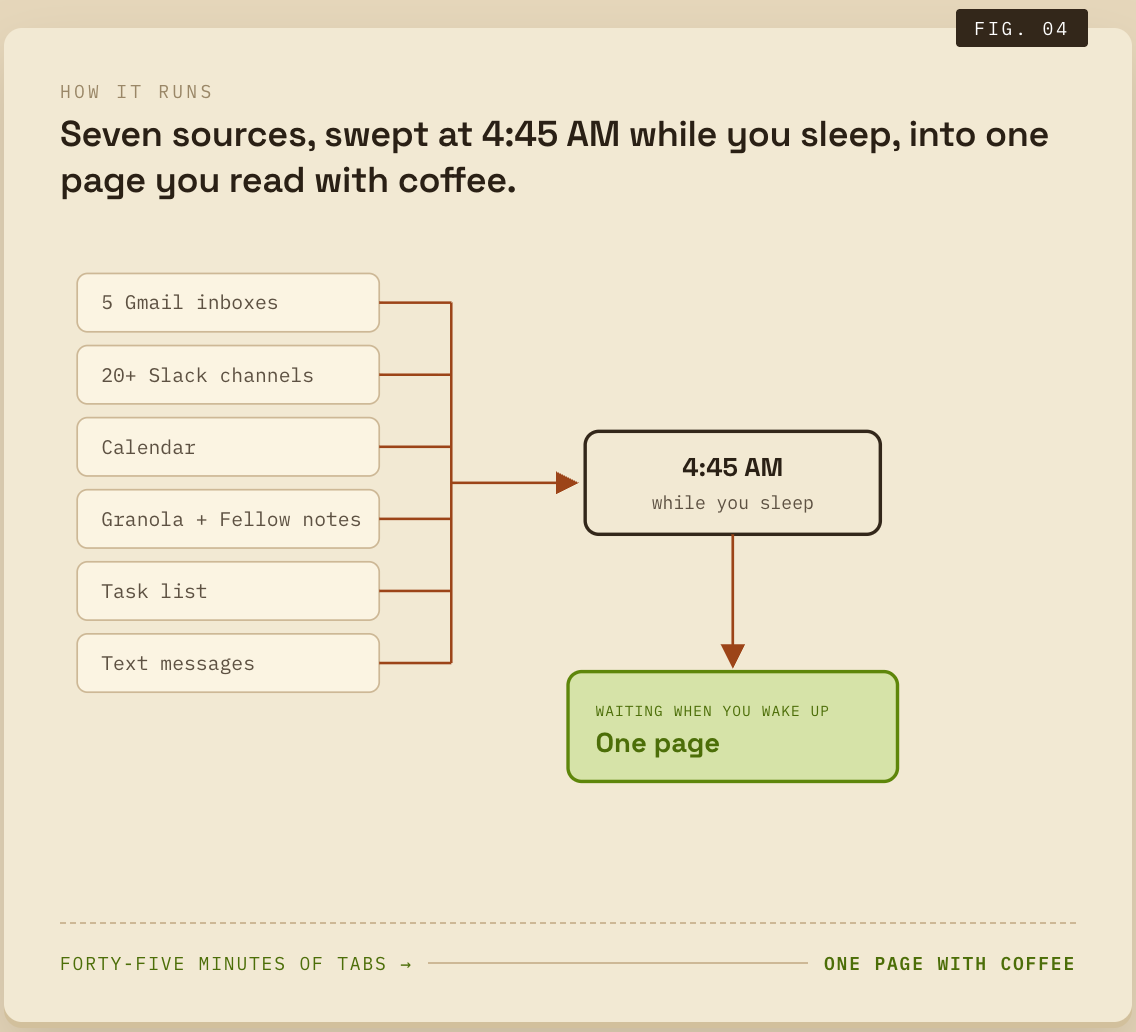
Every morning used to start the same way. Open Gmail. Then the other four inboxes. Then Slack, scroll the channels that matter. Check the calendar. Skim last night's meeting notes. Glance at the task list. See if anything came in by text. Forty-five minutes of opening things and closing things before I'd done a single piece of real work, just to find out what the day held.
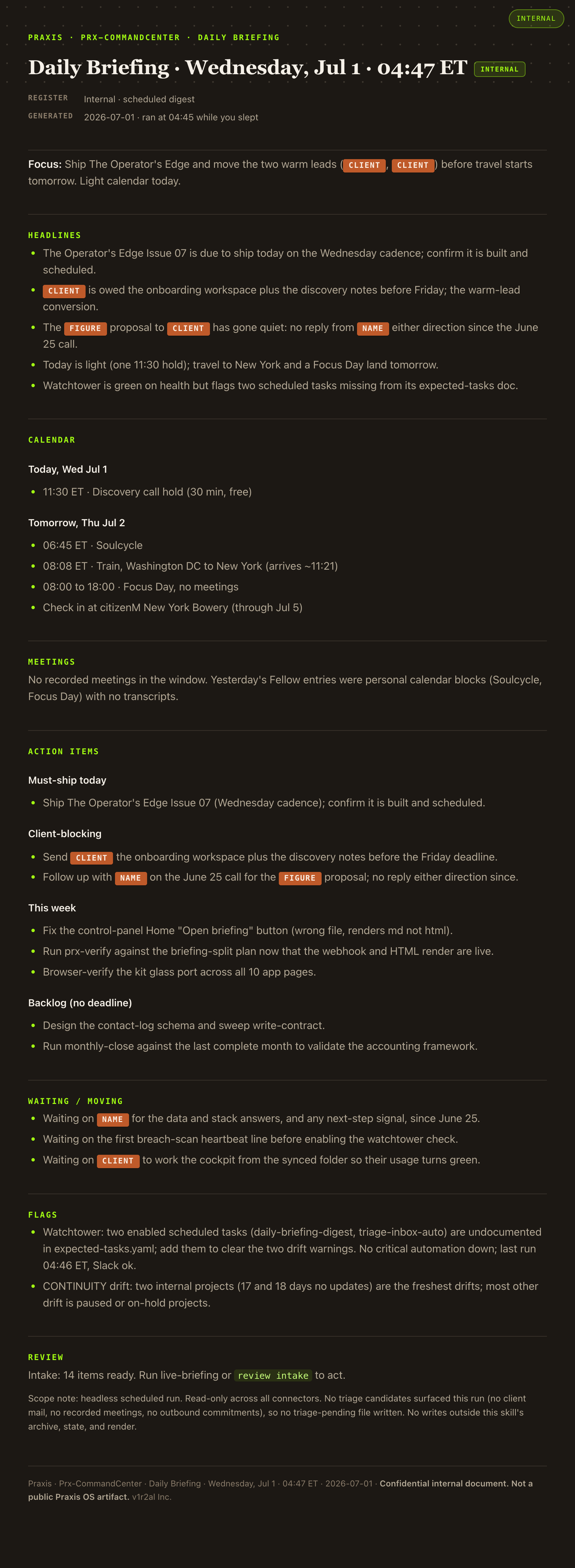
Now I don't do any of it, because the employee from the top of this issue already did. At 4:45, before I'm awake, a skill runs the whole sweep and leaves me one page: what matters today, what's urgent, what can wait. I read it with coffee. The forty-five minutes is gone, and so is the low-grade dread of not knowing what I missed. Here's how you put one to work like that.
Start with what it reads, because this is the part no person would do by hand every morning. Five Gmail inboxes. More than twenty Slack channels. My calendar. My meeting notes from both Granola and Fellow. My task list. Even my text messages. It pulls from every one of those places and sorts the urgent from the noise. That's the legwork you'd love to hand a sharp assistant, except this one does it in the dark while you sleep and never gets tired of it.
But the gathering isn't the real lesson this week. The schedule is. Last week's skill, the weekly update, I still trigger by hand: I say "write the weekly update" and it runs. This one I never trigger. That's the only difference between the two, and it comes down to one instruction.
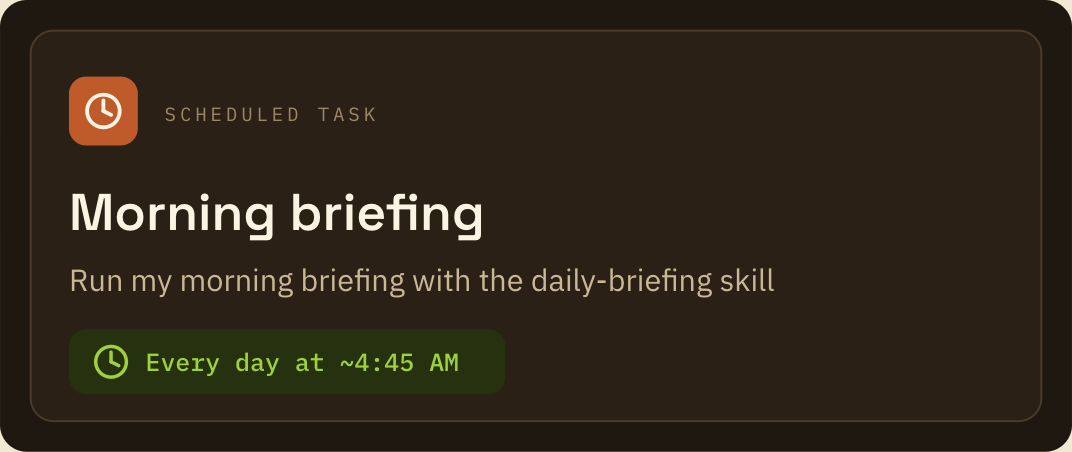
A schedule is just a skill plus a time. It's putting your employee on a shift. Once a skill works when you run it by hand, you tell it when to show up on its own. "Every morning at 4:45." That's the whole step. The tool keeps the shift the way your calendar keeps a meeting, and the skill clocks in whether you're at your desk or asleep or on a plane. You trained it once. Now it just works the hours you gave it.
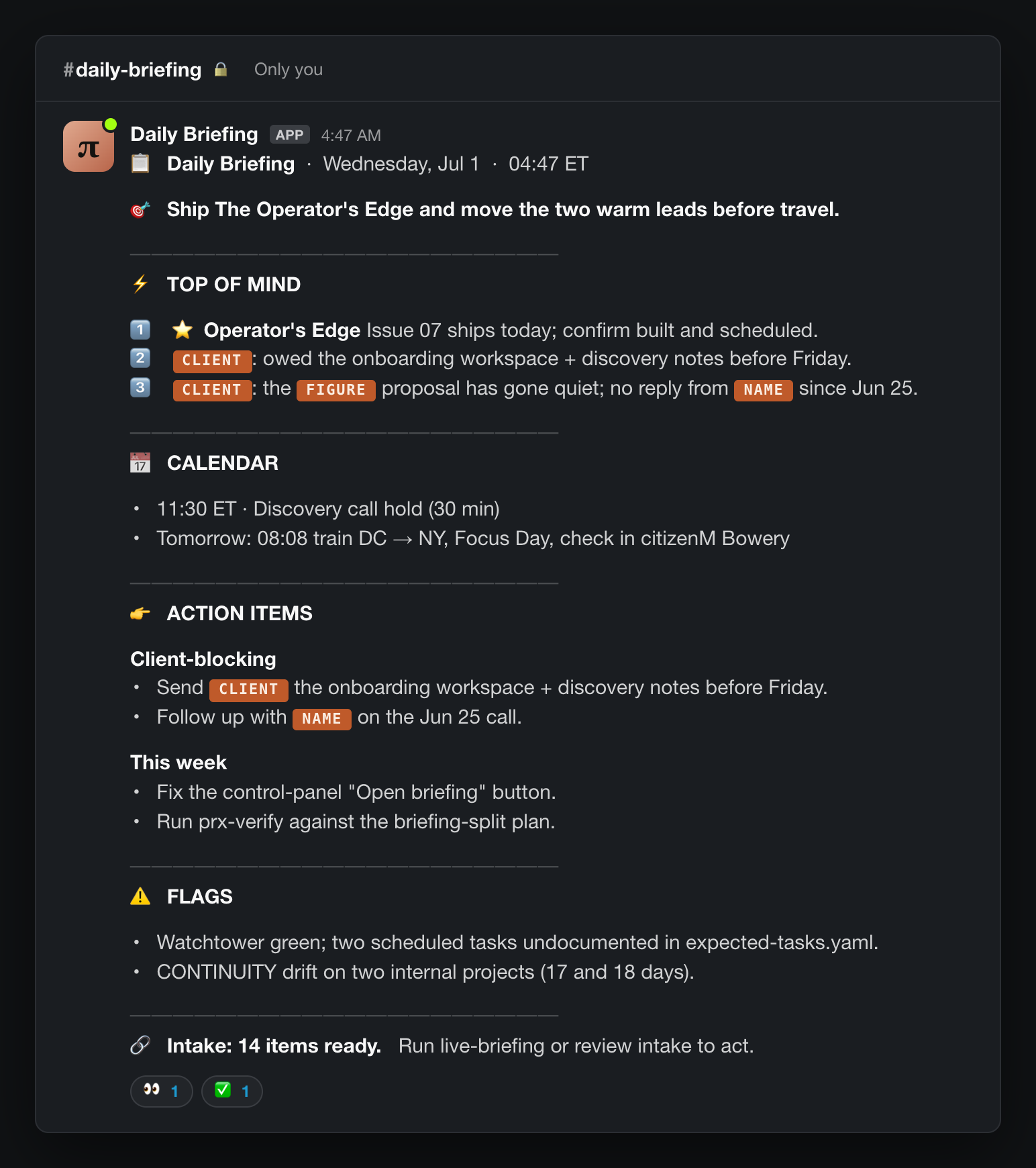
And it tells me when it's done. When the briefing finishes, it drops a note in Slack. Not the whole page, just a nudge that it's ready. So the first thing I see isn't an inbox full of other people's priorities. It's one message from an employee I built, telling me the work is done.
One thing it does not do: act. It reads everything and decides nothing. It doesn't reply to an email, clear a Slack thread, or move a task. It gathers and summarizes, then it stops and waits for me. You wouldn't hand a brand-new hire the authority to send on your behalf on day one, and you don't hand it to software either. The skill does the legwork. I keep every decision that matters, and the send button.
|
In your other tool
ChatGPT has scheduled Tasks that run on a clock the same way, and you can point one at a saved instruction. Gemini's scheduling is thinner today, so there you'd lean on your phone or calendar to trigger it. The principle is identical everywhere: a skill plus a trigger.
|
You don't need to set up the schedule yourself to put one to work. You need to be able to say: here's a job I want done every morning before I start, here are the places it should look, and I want a page to read, not actions taken on my behalf. That sentence is the job description. Any competent builder turns it into a scheduled skill.
A shift isn't the only way to put one to work. Once you have one skill clocking in on a clock, you start seeing the other shapes. I have one that doesn't run on a schedule at all. It clocks in when something happens: a new lead lands, and it sizes the lead up and drops me a note before I've even seen the email. The trigger there is the event, not the hour. Same employee, different starting bell.
And the briefing itself is more than one employee. It's a dozen steps that hand pieces of the job to smaller helper skills working at the same time, then assemble their answers into the one page. That's the line between a skill and a workflow: a skill is one job, a workflow is a whole team of them, orchestrated. You don't build the team on day one. You put one skill on a shift, and a while later you look up and it's grown into a crew.
|
On the site · free
The put-a-skill-on-a-schedule playbook
I put the whole progression on a page you can keep: how to take a skill you already trust and put it on a schedule, with the one instruction that does it. Don't grab it until you have a skill that works by hand. The schedule is the last step, not the first. Open the playbook.
|
Three things worth your attention this week
The model under your tools, and two small businesses letting the work run itself.
|
Your Claude model quietly changed this morning. If you're on the free or paid plan, Sonnet 5 became the default yesterday, and you didn't have to lift a finger. It's built for exactly the kind of multi-step, runs-on-its-own work this whole issue is about, at close to top-tier quality for a fraction of the cost. The same day, the US lifted the restriction that had pulled Fable 5 offline for two weeks, so that one is back today too. The takeaway sits under both: the tools keep getting better and cheaper on their own, and occasionally get pulled and put back. Build your work on your setup and your process, not on whichever model name is on top this week. Anthropic, Sonnet 5 · Jun 30 9to5Mac, Fable 5 returns · Jun 30
A whole back office that runs itself. A company called Lassie now runs the insurance paperwork for more than 700 medical and dental practices: filing claims, posting payments, chasing appeals, all unattended. The line to sit with is that it isn't a copilot that hands you more to review, it does the work. That's the far end of where this is heading for small operators, and the exact question this issue keeps circling: how much of the work are you comfortable letting run without you watching? a16z · Jun 3
One person, a whole team of agents. Entrepreneur profiled a solo bankruptcy lawyer running a small crew of AI agents that handle his client intake, routine questions, and document sorting on their own. No staff, no big system, just one operator who set the repetitive work to run itself and kept the judgment for himself. It's the small-scale version of everything above. You don't need 700 practices to start. You need one job you're tired of doing by hand. Entrepreneur, Sherin Shibu · Jun 5
Trigger, schedule, unattended: the words for work that runs itself
Three plain words behind a skill that runs on its own. Here's each one, and what it changes for you.
|
You'll meet these three words the moment you set up anything that runs on its own. None of them are complicated. They just don't get explained, so here they are, smallest to biggest.
A trigger is whatever starts the skill. It can be a time, or it can be an event. "Every morning at 4:45" is a trigger. So is "the moment a new lead comes in." The skill sits quiet until the trigger fires, then it runs. Everything that runs without you starts with one.
A schedule is a trigger that's a clock. The most common kind. You pick the time, the tool keeps the appointment the way your calendar keeps a meeting, and it runs whether you're there or not. My morning briefing is on a schedule. 4:45 in the morning, every day.
Unattended means it runs whether or not you're watching. That's the whole appeal and the whole risk in one word. The work happens on its own, which is the point, right up until the day it quietly fails on its own and nobody's looking. So here's the rule I follow: anything that runs unattended gets a second, smaller skill watching it, one that tells me the moment it stops. Set it, then watch the watcher.
The takeaway for Wednesday lunch. The only difference between a skill you run and a skill that runs itself is the trigger. Add one, and the work stops waiting for you.
What I won't automate
Automating the legwork only works if you're clear about the part you keep.
|
For every job I've handed to a skill, there's one sitting right next to it I won't touch. The briefing reads my inbox and tells me what's urgent. It does not answer anyone. The hard reply, the one to the client who's unhappy, I still write myself, every time.
That's not nostalgia. It's where the value actually is. The legwork is the part worth giving away: the gathering, the sorting, the first ugly draft. The judgment is the part worth keeping: what to say yes to, who to call back first, when the honest answer is "we're behind, and here's the plan." A machine that does the legwork frees you up for the judgment. A machine that does the judgment has quietly taken your job, and your name is still on the result.
So when I build one of these, I draw the line on purpose. Gather, don't decide. Draft, don't send. Surface it, don't act on it. The skill earns its keep by doing the work I'd never get to. I earn mine by being the one who still decides what to do about it.
Talk Wednesday
One question back to you, and the fastest way to reach me.
|
|
What's the first thing you check every morning?
Reply and tell me. If there's a sweep you do by hand before your day starts, that's a briefing waiting to be built, and the most common answer becomes a future issue with the skill built to match. Just reply to this email. It comes straight to me. [email protected]
|
Talk Wednesday. Marc Marc Kleinmann · The Operator's Edge |
